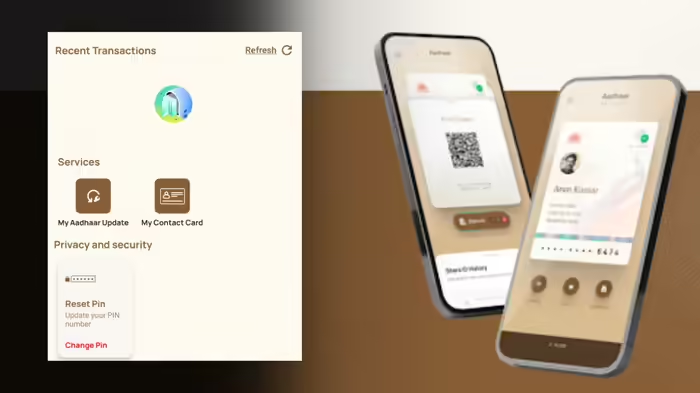
The Unique Identification Authority of India (UIDAI) has introduced a new and highly useful feature in the Aadhaar app called “My Contact Card”. This feature allows users to easily share their verified contact details, including name, phone number, and address, using a simple QR code scan. Now, there’s no need to share your Aadhaar number when you only need to provide your contact details. Let’s explore this feature in detail.
What is the “My Contact Card” Feature?
The “My Contact Card” feature in the Aadhaar app is designed to let users share their verified contact information securely and conveniently. With just a QR code, users can share their details such as name, mobile number, email address, and more with others. When someone scans the QR code, the details will be saved directly to their phone.
This feature ensures that data privacy is maintained, and users have complete control over what information they share. It eliminates the risks associated with sharing sensitive personal details like the full Aadhaar number, which can be prone to misuse.
Why Was the “My Contact Card” Feature Introduced?
The main objective behind this feature is to provide users with an easy and secure way to share their identity and contact details when necessary, without the need to disclose sensitive information like the Aadhaar number. Often, services like hotels, delivery companies, and offices ask for an Aadhaar number to verify identity, but in many cases, only the contact details are required.
By using the “My Contact Card” feature, users can share just the necessary contact information, protecting their privacy and preventing the risk of data leakage or misuse.
How to Use the “My Contact Card” Feature?
To use this feature, you must have the Aadhaar app installed on your phone and be logged in. Once logged in, follow these steps to access and share your contact details:
- Open the Aadhaar app and log in using your Aadhaar credentials.
- Swipe from the bottom to the top of the screen to reveal additional options.
- Under the Services section, you will find the My Contact Card option.
- Tap on it, and your QR code will appear on the screen.
- You can either share this QR code directly or tap the share button to send your details through any app of your choice.
This feature provides a secure, easy-to-use solution for sharing your contact details, while ensuring that sensitive information, like your Aadhaar number, remains protected.
Discover more from SD NEWS agency
Subscribe to get the latest posts sent to your email.