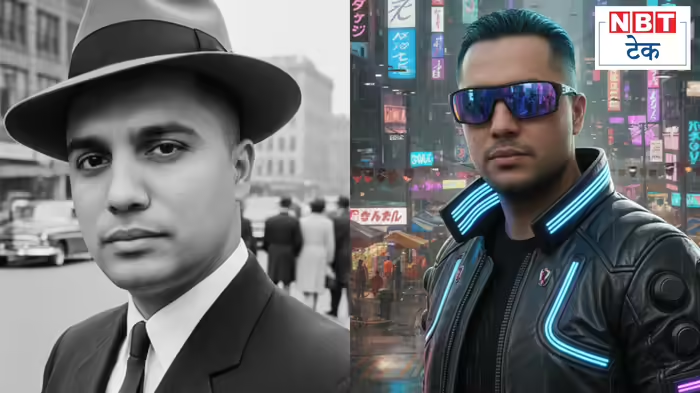
Most people use English prompts to generate AI images on Gemini, but I experimented with Hindi prompts and got some amazing Hollywood-style photos. You can copy and paste these prompts to try them yourself and create cinematic images effortlessly.
Gemini AI Photo Prompts in Hindi
Using AI to generate photos isn’t new—tools like Google’s “Nano Banana Pro” have made it easier for people to create stunning images. While many prompts focus on women, today we bring you 5 Hindi prompts for men that worked beautifully on Gemini.
- Blockbuster Movie Poster (Cinematic Style)
“Transform this photo into an epic action movie poster. Add dramatic lighting on the face, mist and sparks of fire in the background, and write the film title in big, bold letters at the bottom.” - Historical/Vintage Look
“Convert this image into a 1950s black-and-white photo. Include old-fashioned clothing, retro hairstyles, and film grain texture to make it look like a real vintage photograph.” - Painting Style (Artistic Painting)
“Turn this image into a classic oil painting. Use deep colors, canvas texture, and brush strokes inspired by Vincent van Gogh’s style.” - Futuristic World (Cyberpunk)
“Transform this photo into a cyberpunk city scene. Include towering buildings, neon lights in the background, and a person wearing high-tech, futuristic fashion.” - Magical World (Fantasy Style)
“Turn this photo into a fantasy world like ‘The Lord of the Rings’. Add mountains and magical lighting in the background, and dress the person in warrior or wizard-style royal clothing.”
How to Generate Photos on Gemini
- Open Gemini AI on your phone or computer.
- Select the photo you want to transform from your attachments.
- Copy and paste each prompt one by one.
- You can tweak the prompts to customize your image further.
Note: This guide does not endorse the misuse of AI-generated images.
Discover more from SD NEWS agency
Subscribe to get the latest posts sent to your email.