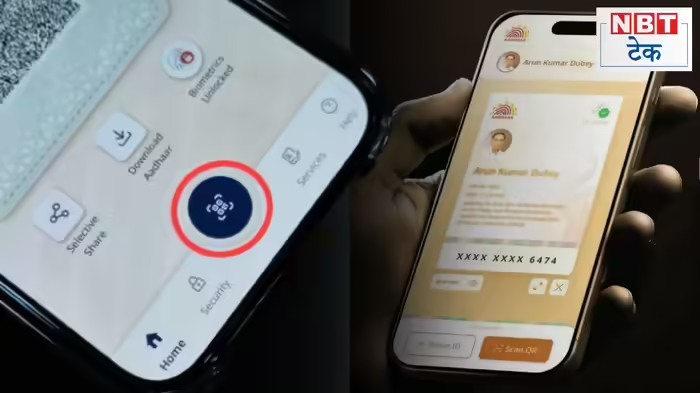
The Unique Identification Authority of India (UIDAI) has officially rolled out the full version of the Aadhaar mobile application, introducing a major upgrade that allows users to verify another person’s identity directly through their smartphone. Although UIDAI had earlier announced January 28 as the launch date, the update has been made available a day in advance.
The newly launched full version brings significant functional and visual changes to the Aadhaar app, marking an important step toward fully digital and paperless identity verification.
What’s New in the Aadhaar App?
The most notable addition in the updated app is the QR code scanning feature, which enables users to scan the digital Aadhaar QR code of another individual and instantly verify whether the Aadhaar is genuine or not. Upon scanning, users can also view essential details linked to the Aadhaar, subject to consent.
This feature is expected to be particularly useful in places where identity verification is mandatory, such as hotels, offices, and service centers, eliminating the need to submit or carry physical copies of Aadhaar.
Alongside functional upgrades, the app now comes with a redesigned interface, offering a cleaner layout and reorganized options for improved user experience.
Some Features Temporarily Removed
While several new features have been introduced, a few options appear to have been temporarily removed in the current update. The options to update name and email ID, previously visible under the Services section, are not available at the moment. Currently, users can only see options for mobile number update and address update.
UIDAI had indicated January 28 as the official launch date, raising the possibility that these missing options may be reactivated in a subsequent update.
How to Get the New Aadhaar App
Existing users can access the full version by updating the Aadhaar app from the Google Play Store (Android) or Apple App Store (iOS). New users installing the app for the first time will automatically receive the updated version.
How to Verify Someone’s Aadhaar
To verify another person’s Aadhaar using the new app:
- Open the Aadhaar app on your smartphone.
- Tap on the QR Code Scanner option on the home screen.
- Scan the QR code displayed on the other person’s digital Aadhaar.
- The app will instantly show whether the Aadhaar is valid.
- Users can tap on View Details to check the available information, if required.
A Step Towards Digital Trust
With the launch of the Aadhaar app’s full version, UIDAI has strengthened the ecosystem of secure, contactless, and paperless identity verification. The update is expected to enhance convenience for citizens while reducing the risk of fraud and misuse of physical Aadhaar copies.
Further refinements and feature activations are anticipated as UIDAI continues to optimize the app in the coming days.
Discover more from SD NEWS agency
Subscribe to get the latest posts sent to your email.