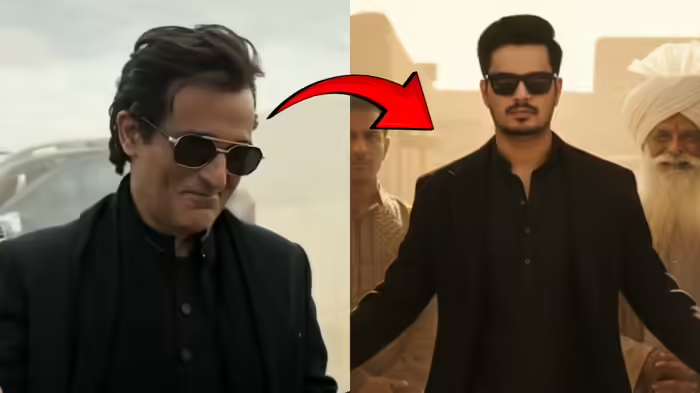
The most viral moment from the film Dhurandhar is undoubtedly Akshaye Khanna’s grand entry as Rehman Dakait—a scene that has taken social media by storm. The stylish way he steps out of the vehicle, greets people, and breaks into dance has inspired fans to recreate his iconic look. If you, too, want to try the trending “Rehman Dakait look,” Google’s Gemini AI can help you generate an instant, hyper-realistic version of yourself in that style.
With the right prompts and a clear photo, Gemini’s image-generation tool can deliver a striking, cinematic transformation. Here’s how you can do it.
How to Create the ‘Rehman Dakait’ Look Using Gemini AI
To generate the image, you’ll need to use Google Gemini’s Nano Image Creation Tool. Follow these steps:
- Go to: aistudio.google.com/prompts/new_chat
- Upload a clear photo of your face.
- Paste the desired prompt.
- Click Run.
Within seconds, the AI will create a dramatic, cinema-style image featuring you in the Rehman Dakait look.
Prompt 1: Desert Village Cinematic Entry
Use this prompt for a rustic, dramatic entrance inspired by Akshaye Khanna’s viral scene:
“Ultra-realistic, cinematic full-body portrait of the same young man from the reference photo (same hairstyle, sharp eyebrows, trimmed beard, confident expression). Create a high-quality scene set in a rustic desert village with mud-brick walls. The stylish man steps out confidently from a wooden shaded doorway wearing an all-black outfit—long black coat, black kurta inner layer, and dark sunglasses. His arms extend outward as he walks with attitude. Behind him stand two men in traditional attire—one with a large turban and white beard smiling proudly, the other serious in brown clothing. Warm desert sunlight filters through the wooden roof, casting dramatic shadows. A woven circular basket hangs on the mud wall to the left.”
Prompt 2: Powerful Villain-Style Entry
This prompt creates a heroic, slow-motion villain walk with dramatic lighting:
“Ultra-realistic, cinematic portrait of the same young man (same hair, eyebrows, beard, expression). Show a powerful entrance of a stylish villain in a black kurta, black overcoat, and dark sunglasses. Golden sunlight filters through patterned fabric shades, creating dramatic shadows on his face. Two men follow him—one elderly with a long white beard and black turban wearing layered robes and heavy jewelry; the other younger with a beard and glasses in dark ethnic attire. The setting resembles an ancient marketplace or desert fort with sandstone textures and warm tones. Low camera angle for a heroic effect. Highly detailed faces, crisp shadows, cinematic depth of field, rich color grading.”
Prompt 3: Bold Desert-Hero Look With SUV
This one delivers a modern, stylish gangster-hero appearance:
“A charismatic young man with slicked-back dark hair and gold-rimmed aviator sunglasses, wearing a black suit jacket over a traditional black tunic (shalwar kameez). He stands with a confident smirk, palms open in a ‘what can you do?’ gesture. The background is a dusty desert or rocky terrain with a luxury SUV parked behind him. Muted beige tones, cloudy skies, cinematic lighting, shallow depth of field, 4K ultra-detailed Bollywood-style framing, dramatic color grading. Preserve the face 100%—no alteration—same face as reference image.”
With these three powerful prompts, anyone can transform their photo into a “Rehman Dakait” style cinematic moment—complete with swag, dramatic lighting, and Akshaye Khanna-level attitude.
Discover more from SD NEWS agency
Subscribe to get the latest posts sent to your email.