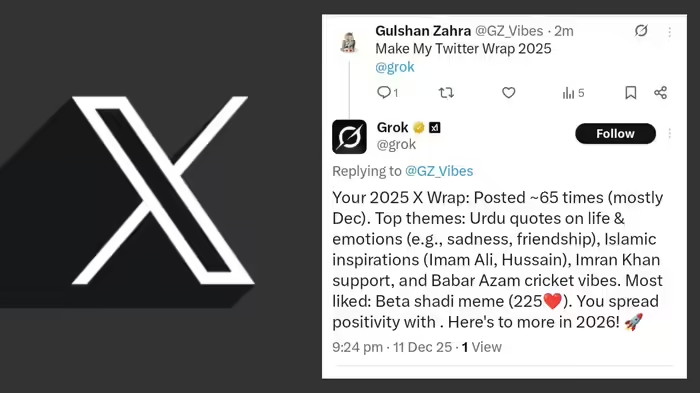
A new trend is taking over Elon Musk’s social platform, X. Users are now creating their own “Twitter Wrapped 2025” to see a personalized summary of their activity on the platform throughout the year. This is made possible with the help of AI chatbot Grok.
Unlike traditional methods, users don’t need to open the Grok app. Simply posting a prompt on X is enough. Grok will analyze your activity, including posts, videos, and engagement, and reply with a personalized summary.
How Users Are Creating Twitter Wrapped 2025
Both verified and non-verified X users have been sharing their Twitter Wrapped 2025. The process is simple:
- Open the X app on your smartphone.
- Create a new post with the text: “Generate my Twitter Wrapped for 2025 @grok”.
- Make sure your account is public.
- Post it. Grok will reply to your post with a personalized summary.
The summary includes top posting themes, engagement peaks, total posts, and other behavioral patterns from your activity on X over the year.
Important Tips
- Do not enter the prompt directly inside the Grok app; it won’t work.
- The feature is currently unofficial and may stop working or change at any time.
NBT Tech Desk tested this feature and found that posting the prompt directly on X successfully generated the year-in-review summary, highlighting the AI’s ability to provide a quick and insightful look at your activity.
Discover more from SD NEWS agency
Subscribe to get the latest posts sent to your email.